On March 27, 2026, UC Riverside’s ServiceNow portal was upgraded to Zurich, and now includes new features and improvements built on the ServiceNow AI Platform®.
The Zurich upgrade introduced the Coral theme, a new functionality allowing users to personalize their workspace. This update brings a cleaner, more intuitive interface designed for productivity.
- Modern Look: A fresh aesthetic with improved readability and brand-neutral illustrations.
- Dark Mode: A native dark theme to reduce eye strain and improve comfort.
- Focus & Clarity: Reduced visual clutter and consistent styling across all forms and lists.
- Inclusive Design: Enhanced accessibility standards to ensure a better experience for everyone.
The Coral theme is now available to ServiceNow users. To change your theme, follow the steps below.
- Click on the icon with your initials in the upper-right corner.
- Select Preferences.
- Select Theme.
- Select the Coral box.
- If you want the dark mode option, select the “Dark” circle.
- Click X to close the Preferences window.
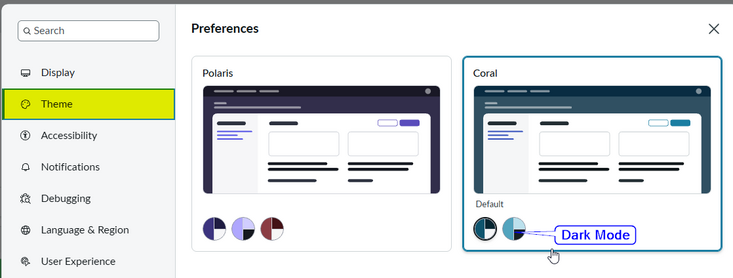
If you don’t see “Preferences” when clicking the icon with your initials:
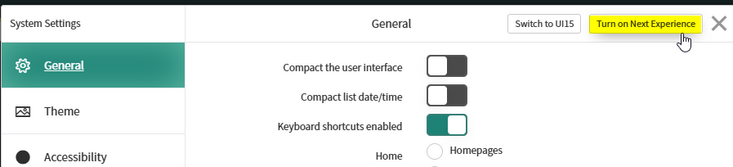
- Click on the Settings icon (cogwheel icon).

- In the System Settings window, select the Turn on Next Experience button.
- Follow the steps outlined above.
Let us help you with your search