There is a new, more sophisticated cyberattack gaining widespread traction on the web. ClickFix is a popular social engineering tactic that deceives victims into copying and executing malicious commands on their systems under the pretense of resolving a fabricated technical issue or human-verification prompts, often resulting in malware infections. This type of attack can typically be encountered in compromised websites.
How ClickFix Campaigns Work
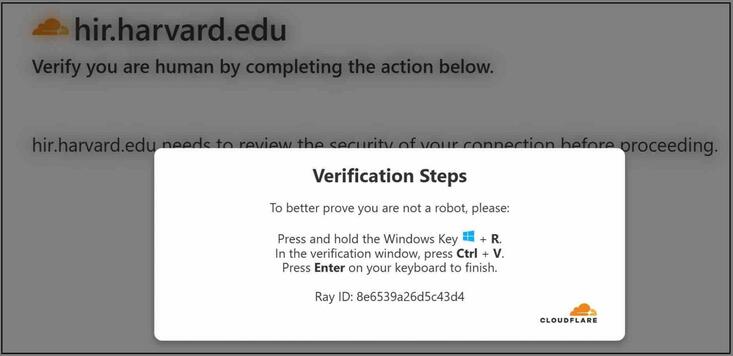
Threat actors hijack legitimate, high-reputation websites and silently redirect visitors to malware, without the sites’ owners or their visitors knowing. ClickFix campaigns primarily rely on “pastejacking,” where a threat actor hijacks a victim’s clipboard with a complicated command while distracting them with visual lures such as fraudulent reCAPTCHA or Cloudflare Turnstile overlays.
In some instances, malicious commands are not automatically pasted into the victim’s clipboard, but rather, victims are manipulated into copying and running the command manually.
If a website is compromised, you may encounter pop-ups informing you there is a problem with your device or that you need to verify you are human by completing an action that requires you to run a command on your device (instead of going through the typical CAPTCHA verification). You may then be tricked into copying, pasting, or running a command to “fix” the bogus issue or to be granted access into the website.
After executing the command on your device using trusted system tools like the Windows Run dialog box, PowerShell, or the macOS Terminal, the threat actor will proceed to silently execute malware on your device. This user-assisted execution allows malicious scripts to bypass traditional browser and endpoint security perimeters.
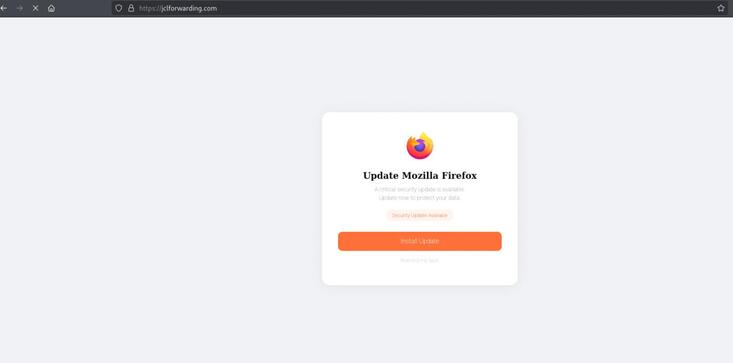
Another similar cyberattack known as FakeUpdates lure people using fraudulent update notices for web browsers like Chrome, Firefox, Edge, Safari, Opera, and Brave.
Users who attempt to update their browser version through these fraudulent notifications may unknowingly make their devices vulnerable to malware.
Red Flags to Watch Out For
If you encounter a website pop-up telling you to fix an issue on your browser or device or asking you to verify your identity by running a command, do not complete the action. Look out for these red-flag instructions:
- Press the Windows key + R
- Open PowerShell, Terminal, or Command Prompt
- Copy and/or paste this code
- Run this to prove you’re not a robot
- Install this update or extension to continue
How to Avoid Falling for ClickFix Campaigns
Anyone can become a target of ClickFix and FakeUpdate campaigns. If you encounter website pop-ups that urge you to take immediate action:
- Stop and do not complete any action you are urged to do. Instead, close the page, tab, or pop-up window.
- Report the incident to the UCR ITS Information Security Office by sending an email to abuse@ucr.edu.
To securely update your web browser or your device’s system, always use the built-in update feature. Avoid clicking on pop-ups, emails, or random links that claim your browser or system is out-of-date. More importantly, avoid executing commands in the Windows command prompt or macOS Terminal that you don’t fully understand.
Legitimate updates will never be pushed through unprompted third-party download sites. Likewise, UCR Information Technology Solutions (ITS) will never ask you to paste commands from a website.
What to Do if You Fall for a ClickFix Campaign
If you suspect your device or a website you visited is compromised, report the incident to the UCR ITS Information Security Office right away by sending an email to abuse@ucr.edu or by calling BearHelp at (951) 827-4848 (Monday to Friday, 8 AM to 5 PM).
If you receive suspicious email, report using the Report Suspicious button in your UCR email account.
Let us help you with your search